
Prisma Health GO
Prisma HealthMedical
4.354.00 Reviews
- Version
- 3.9.0
- Installs
- 100.00K
- Age Rating
- Everyone
Screenshots
Our Review of Prisma Health GO
 Analysis by Appyee
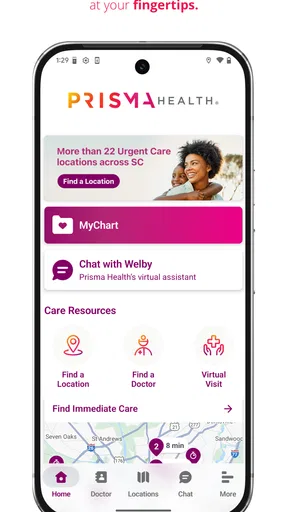
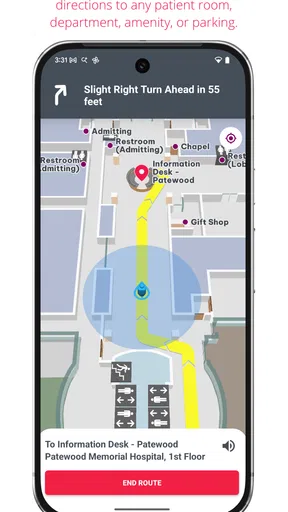
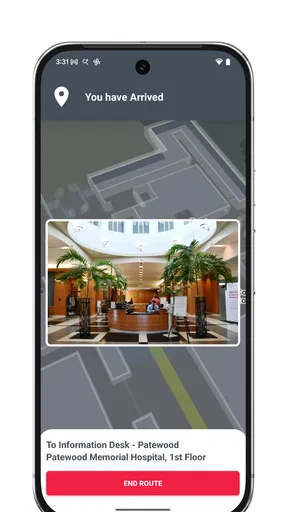
Finding your way around a large hospital can be surprisingly stressful, especially when you are already worried about an appointment, helping a family member, or trying to arrive on time. Prisma Health GO is a free medical app from Prisma Health that focuses on one practical problem: guiding visitors through hospital spaces with step-by-step navigation. I see it as a specialist tool rather than a general health companion, and that narrow purpose is also its biggest strength.
My first impression is that the app makes most sense before or during a visit to a Prisma Health facility. It is not trying to replace a doctor, organize a complete medical record, or offer broad wellness advice. Instead, it is designed to reduce the uncertainty between entering a hospital and reaching the right destination. That may sound simple, but in a busy medical building, knowing whether to turn, take an elevator, or continue through another corridor can make a meaningful difference.
How Prisma Health GO fits into a real hospital visit
The app belongs in the medical category, but I would not compare it directly with symptom checkers or appointment-management tools. Its role is closer to a digital wayfinding assistant. When I think about the usual alternatives, the first is asking at a reception desk, followed by printed signs, paper maps, or using a general map app. Those options can help, but they are not equally useful indoors. A regular map application may get you to a hospital entrance without helping you understand the route inside the building.
That distinction matters in a realistic situation. Imagine arriving for an imaging appointment while accompanying an older relative. You may know the hospital address, but the appointment could be in a particular department, wing, or floor. Instead of stopping repeatedly to ask for directions, a dedicated hospital-navigation app can give you a more focused route. I would still check the appointment details and arrive with extra time, but the app can take some of the guesswork out of the final part of the journey.
The developer is Prisma Health, so the app is naturally most relevant to people visiting its facilities. I would not install it expecting useful directions for every hospital in a city. Its value depends on whether the place you need to visit is supported within the Prisma Health environment. That makes it highly useful for the right visitor and largely irrelevant for someone using another health system.
The current listing identifies the app as version 3.9.0, which suggests an established product rather than a brand-new experiment. It was released on April 12, 2019, and has built an audience of over one hundred thousand installs. Its average rating is 4.3 from around two hundred ratings, with dozens of written reviews. I read those figures as a sign of practical interest, while remembering that a navigation tool can feel excellent in one hospital and less useful in another depending on the visit and the building.
The experience is about reducing decisions, not adding medical information
What I like about this concept is that it addresses a very specific kind of mental load. Hospitals often contain several entrances, reception areas, elevators, waiting rooms, and departments with similar-sounding names. When someone is anxious, tired, or carrying paperwork, even a small navigation problem can become frustrating. A route-focused app gives the visit a clearer sequence: start from the relevant point, follow the directions, and confirm that you are moving toward the intended destination.
That focus also helps set expectations. This is not an app I would open for medication reminders, test interpretation, emergency advice, or communication with a care team. If I needed those services, I would choose a patient portal or a dedicated clinical app instead. Prisma Health GO is best judged by whether it helps a visitor move through a hospital, not by features outside that job.
Useful preparation before leaving home
I would use it before setting off, not only after parking. The most helpful workflow is to review the destination while I still have time to correct a mistake. I would confirm the facility name, check the appointment message for the department wording, and then use the app to become familiar with the route. This matters because medical appointments sometimes use department names that are not identical to the wording a patient remembers.
A second useful habit is to treat the app as a navigation aid rather than the only plan. I would keep the appointment confirmation available, note any arrival instructions, and allow time for parking, check-in, and possible delays. Indoor directions cannot solve every part of a hospital visit. They may guide me to the building or department, but reception staff can still be the best source for last-minute changes or instructions specific to the appointment.
I would also avoid waiting until the moment I am standing outside to explore everything for the first time. If the visit is important, opening the app earlier gives me a chance to understand the starting point and recognize where I may need assistance. This is especially useful when traveling with children, an older adult, or anyone with limited mobility. A calm preview can be more valuable than rushing through instructions while trying to find a parking space.
Where it can be more helpful than a normal map
General navigation apps are excellent for roads and public entrances, but hospital interiors are a different problem. They usually do not explain the sequence inside a complex medical facility in the way a purpose-built tool can. Printed signs are also limited: they may point toward a department but not provide a personalized route from the place where you actually enter.
Prisma Health GO has a clearer advantage when the destination is inside a large or unfamiliar facility. The app's step-by-step approach can reduce the number of decisions I need to make. Instead of constantly asking, “Is this the right corridor?” I can use the route as a reference and focus on landmarks, floor changes, and the next instruction.
There is a trade-off, though. A normal map app is broader and more useful across different hospitals, clinics, pharmacies, and streets. If I visit many health systems, keeping a general map application may be more convenient overall. I would choose Prisma Health GO for a Prisma Health visit and a general map for the wider journey or for facilities outside that network.
What the version history means for current users
The presence of version 3.9.0 gives existing users a useful signal: the app has moved beyond its initial release and is still represented as a maintained product in the current listing. I would expect that to be more reassuring than downloading an abandoned, early version of a navigation tool. A wayfinding app needs to remain aligned with changing buildings and visitor routes, so continued version progression is important.
At the same time, a version number alone does not tell me exactly what changed in each update. I would not assume that every hospital has identical coverage or that every route has been redesigned recently. The sensible approach is to test the app against the specific facility and destination for the upcoming visit. If the route looks unclear, I would contact the facility rather than rely on an assumption based only on the version number.
For someone who has used an earlier release, the main benefit of staying current is the possibility of receiving the latest available navigation adjustments and compatibility improvements. The practical test is simple: can the app recognize the intended facility, identify the destination, and present directions that make sense from the chosen starting point? If yes, the update has value even if the interface feels familiar.
Small workflow details that can prevent a bad experience
One non-obvious point is that the starting location matters as much as the destination. Entering through a different door, arriving from a parking area, or beginning near a lobby can change the route. I would select the starting point carefully instead of assuming the app knows where I am in the building. If the first instruction seems inconsistent with where I am standing, I would pause and recheck before walking farther.
Another is to read the destination wording literally. A hospital may have several areas that sound related, and choosing a broad department name when the appointment specifies a particular service could send me toward the wrong place. I would compare the app's destination label with the appointment message before starting the route. This is a simple check, but it can prevent an avoidable detour.
A third is to use the app as a shared tool when traveling with someone else. If I am accompanying a family member, I would show them the next major step rather than silently walking while looking at my phone. That keeps the person involved and makes it easier to notice when the route does not fit their mobility needs. For a wheelchair user or someone who cannot manage stairs comfortably, I would treat any route instruction involving a floor change as a prompt to ask staff about the best accessible option.
I would also keep the phone usable during the visit. A low battery, poor attention, or a phone buried in a bag can make even good directions inconvenient. The app can simplify navigation, but it cannot replace awareness of signs, staff instructions, or changes inside the building. That is particularly important in medical facilities, where corridors may be temporarily closed or redirected.
Limitations I would consider before depending on it
The first limitation is its narrow geographic scope. This is a Prisma Health tool, not a universal hospital guide. If my appointment is with another provider, the app is unlikely to become part of my regular routine. That is not a flaw in the design so much as a boundary that potential users should understand before making it their default navigation app.
The second limitation is that indoor navigation depends on the accuracy of the facility information and the conditions on the day of the visit. Construction, temporary closures, changed reception procedures, or a relocated department can make a route less reliable. I would still follow signs and ask an employee when something conflicts with the app. In a hospital, current human guidance should win over a digital route.
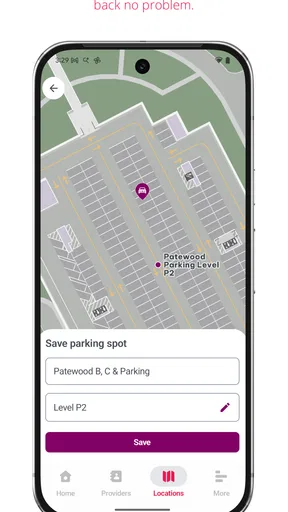
The third is that a step-by-step route may not answer every practical question. I may still need to know where to park, where to check in, how early to arrive, or which documents to bring. Those instructions usually come from the appointment communication or the facility itself. I would use Prisma Health GO for movement through the site, not as a substitute for reading the appointment information carefully.
There is also a human-factor limitation. Some visitors may find a phone-based route harder to follow than a large sign or a staff explanation. People with poor eyesight, low confidence using smartphones, or limited access to mobile data may prefer personal assistance. I would not pressure someone to use the app if a receptionist can guide them more comfortably. The best navigation method is the one that gets the person safely and calmly to the right place.
Who should use it, and who should choose something else?
I would recommend trying it to anyone with an upcoming visit to a Prisma Health hospital who expects the building to be unfamiliar. It is particularly well suited to first-time visitors, people accompanying relatives, and anyone who becomes stressed by complicated indoor layouts. The app is also a reasonable option for repeat visitors who already know the campus but need a different department or entrance.
I would be more cautious about recommending it to someone who wants a complete healthcare-management app. If the main need is appointment scheduling, records, prescriptions, messaging, or clinical information, this is the wrong category of tool. A patient portal would be a better choice for those tasks. Likewise, someone visiting multiple unrelated hospitals may prefer a general mapping app plus the official instructions from each facility.
The age rating is Everyone, and the app is free to download. That makes it easy to suggest to a family member without adding a purchase decision to an already stressful appointment. Still, free access does not remove the need to check whether the relevant facility and destination are supported. I would make that check before relying on it for a time-sensitive visit.
What I would like users to watch as the app evolves
For current users, I would watch how well the app keeps pace with changes inside Prisma Health facilities. Navigation software is only as useful as its relationship with the real building. Updated routes, clearer destination labels, and better handling of entrances would have a direct effect on the experience. Those are the areas I would pay attention to when deciding whether a newer release has improved everyday use.
I would also watch for how the app handles the difference between a route that is technically short and one that is practical for a patient. A visitor carrying equipment, using a mobility aid, or accompanying a child may value fewer stairs, simpler turns, and clearer landmarks more than the shortest path. If future changes make those trade-offs easier to understand, the app could become more helpful for a wider range of visitors.
Existing users should keep their expectations grounded. A newer version can improve the digital experience, but it cannot guarantee that a hospital visit will be simple. Parking, check-in, delays, and staff directions remain separate parts of the journey. I would keep using the app as a preparation and wayfinding aid while treating it as one piece of a larger plan.
My overall view after considering the complete journey
Prisma Health GO succeeds because it concentrates on a problem that general health apps often ignore: the final indoor route to a hospital destination. I like that specialization. When I am entering an unfamiliar medical building, a focused route can be more useful than a crowded app full of unrelated tools. The strongest use case is a planned Prisma Health visit where I can check the destination beforehand and use the directions alongside appointment instructions.
Its weaknesses are equally clear. It is not a universal hospital navigator, it cannot replace staff when conditions change, and it does not cover the broader tasks people may associate with healthcare apps. Those limits mean I would not recommend it to everyone. I would recommend it to the person who has a Prisma Health appointment and wants to reduce the chance of getting lost once inside.
With a 4.3 average and more than one hundred thousand installs, it has enough adoption to be worth considering, while the version 3.9.0 listing indicates a product that has continued beyond its original launch. My advice is to install it before the visit, match the destination carefully to the appointment details, choose the correct starting point, and keep staff guidance as the final authority. Used that way, this free app can turn one of the most confusing parts of a hospital visit into a more manageable series of steps.
Verdict
Strengths of Prisma Health GO
- Quick access to Prisma Health appointments and care options
- Secure messaging helps connect patients with their care teams
- Digital access to health records keeps important information in one place
- Useful tools for managing prescriptions and medication details
- Supports virtual care, reducing the need for some in-person visits
Limitations of Prisma Health GO
- Features may vary depending on your Prisma Health location and care provider
- Requires an active Prisma Health account for most functions
- Some users may experience login or verification issues
- Appointment availability depends on provider schedules and location
- The app is mainly useful for existing Prisma Health patients
Similar Picks in This Category
View All
WebMD: Symptom Checker
WebMD, LLC4.1

Microphone Amplifier
DOSA Apps4.2

Anatomy Learning - 3D Anatomy
3D Medical OU4.5

Period Tracker and Calendar
SimpleInnovation4.9

GoodRx: Prescription Coupons
GoodRx4.8

CVS Health
CVS Pharmacy4.5
Frequently Asked Questions
What is Prisma Health GO used for?
Prisma Health GO is designed to help eligible Prisma Health patients and members manage healthcare-related tasks from a mobile device. Depending on your account and location, you may be able to view health information, manage appointments, communicate with care teams, review certain documents, and access other digital services. Available features can vary by user type and may require an active Prisma Health account.
How do I sign in to Prisma Health GO?
To use Prisma Health GO, you generally need valid Prisma Health login credentials or another approved sign-in method provided by the organization. New users may need to complete registration, verify their identity, and accept the app’s terms and privacy notices. If you cannot remember your password or encounter an access problem, use the in-app recovery options or contact Prisma Health support.
Can I schedule appointments and communicate with my doctor through the app?
Prisma Health GO may provide appointment-management and communication tools for supported services, but the exact options depend on your provider, department, insurance details, and account permissions. You may be able to request or view appointments, receive reminders, and send secure messages. The app should not be treated as a replacement for emergency care or urgent medical assistance.
Is my personal health information secure in Prisma Health GO?
The app is intended to provide access to protected healthcare information through Prisma Health’s digital systems and normally requires authentication. Even so, users should protect their device with a passcode or biometric lock, avoid sharing login details, and sign out on shared devices. Review the current privacy policy and permissions before using the application, since data practices may change.
Is Prisma Health GO free to download, and what devices support it?
Prisma Health GO is typically available as a free download from the official Android or iOS app store, although using some healthcare services may depend on your relationship with Prisma Health, insurance coverage, or provided credentials. Before installing, check the store listing for supported operating-system versions, required storage, and the latest compatibility information. Availability may also vary by region.
